Payments
How to open the payment details panel
Click any transaction row to open the payment details panel on the right. This panel is the full transaction workspace. It shows the customer, booking ID, payment method, customer credit balance when enabled, full amount summary, line items, taxes and fees, payment status controls, balance collection actions, and refund actions.
Click any transaction row to open the payment details panel on the right. This panel is the full transaction workspace. It shows the customer, booking ID, payment method, customer credit balance when enabled, full amount summary, line items, taxes and fees, payment status controls, balance collection actions, and refund actions.
Open the payment details panel
Click any transaction row to open the payment details panel on the right. This panel is the full transaction workspace. It shows the customer, booking ID, payment method, customer credit balance when enabled, full amount summary, line items, taxes and fees, payment status controls, balance collection actions, and refund actions.
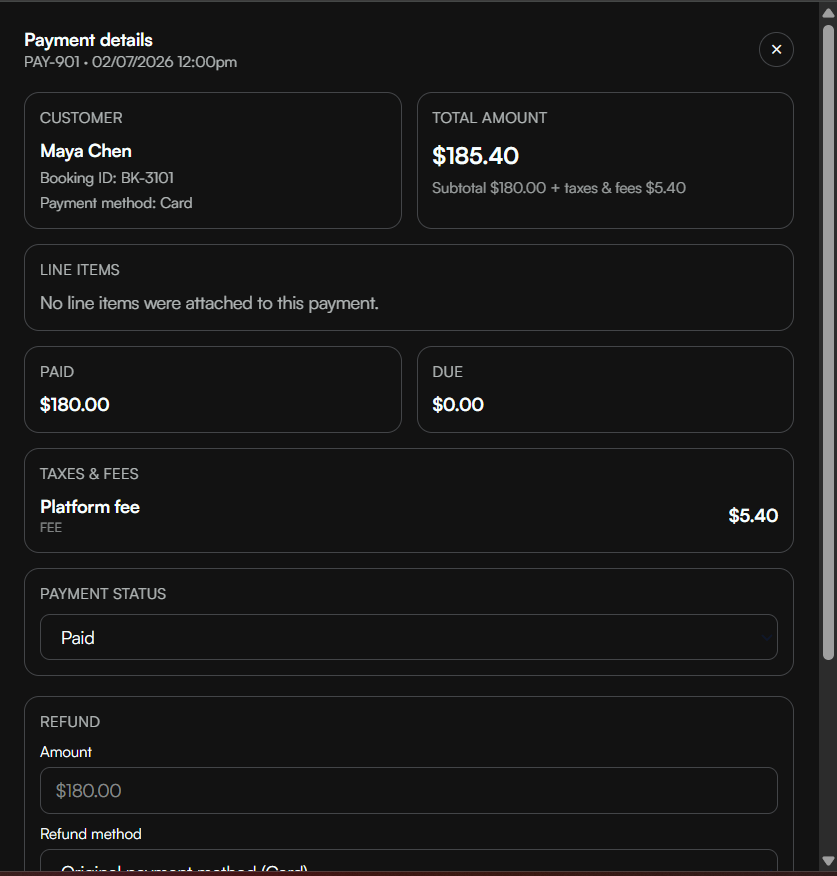
- The header shows the transaction ID and processed date/time.
- The customer card shows the guest name, linked booking ID, and the payment or refund method.
- The amount card summarizes the total and, when relevant, separates subtotal from taxes and fees.
- The line items area explains exactly what the guest paid for.
- The taxes and fees area breaks out tax lines and fee lines for transparency.
Tips
- Train staff to open the payment detail panel before answering refund or invoice questions so they can see the full transaction context.
- Use the search and filter controls every morning to review unpaid transactions and recent refunds.
- Processing fees from Stripe or Square are distinct from any platform fees shown in the booking breakdown.